Amourelle Products Ltd

Garage Door Remote
Remote control handset and key-fob transmitters for
electric garage door and gate operators by mail order

Secure On-Line Shopping - Same-Day despatch of most items

Items in Basket:  

Total Price:

View Basket

View Shopping Basket


Home
Door Spares
Automation
Handset Pictures
Programming
Receivers
Accessories
Batteries
Feedback
Contact Us
Site Index
Search


Select Your
Manufacturer


Alltronik
Aprimatic
Autodor (Catnic)
AutoGlide (Cardale)
Bernal/ / Weller
BFT
BPT
Bosch
CAME
Cardale
Catnic
Challenger
Chamberlain
Dura-Lift
Ecostar (Hormann)
Fadini Astro
Garador
Genie
Gibidi
Henderson
Hormann
Intercon
Lift-Boy
LiftMaster
Linear
Marantec
Merlin
Millenium
Moore-O-Matic
MotorLift
Multi-Code
Novoferm
Seceuroglide
Seip
Sentry
SlaveDor
Somfy
Sommer
Stanley
Steeline
Telectron
Visonic
Wessex
Wickes


24 hour

On-Line shopping

Same Day Despatch

Next-Day delivery option
more info

'live' up-to-minute
stock quantities
are shown in red

Add to Favourites


 Programming Procedure
for
Hormann Ecomatic & SupraMatic
remote control transmitters
(also applies to Garador Auto Expert & Auto M2 electric operators)

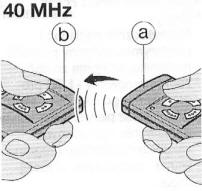
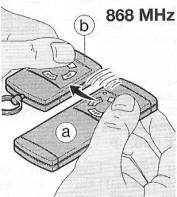
Hormann HS, HSM & HSE series transmitters can learn the
unique security code from an existing working transmitter
Hormann 40Mhz code copy Hormann 868Mhz code copy
(a) original (teaching) transmitter
(b) replacement learning transmitter

Standard Programming Procedure (Method 'A')

1/ Hold the transmitter which is to 'teach' the code (teaching transmitter) 'a' and the transmitters which is to 'learn' the code (learning transmitter) 'b' beside each other as illustrated above.

2/ Press and hold the desired button on the teaching transmitter - the LED on it should glow

3/ Continue to depress the button on the teaching transmitter and press and hold the button which is to learn this code on the learning transmitter - the LED on the learning transmitter initially flashes slowly for 4 seconds, then starts flashing more rapidly to confirm the learning process is complete

4/ Release the buttons on both transmitters and check that both transmitters operate the door, - repeat steps 1 - 4 again if it fails to operate the door.

Caution  --  Activation of the teaching transmitter during the
learning procedure may set the door in motion if within range !

Note: If your transmitters are used to control more than one door you'll need to carry out the programming procedure separately for each button.


Alternative Programming Procedure (Method 'B')

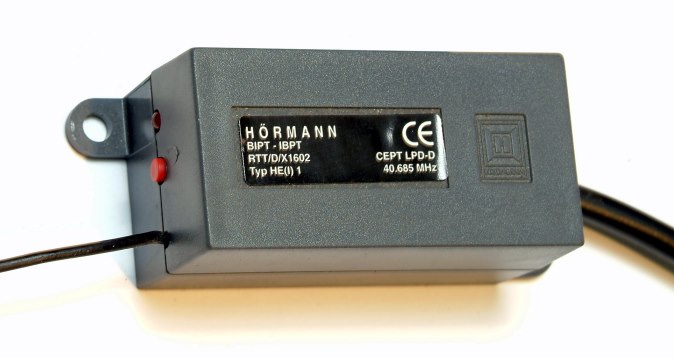
If an original transmitter has been lost or stolen, or you no longer have an original 'working' keyfob you must program a new replacement keyfob to your Hormann receiver unit by the following method :- Examine your Hormann garage door operator unit and you should find a receiver module attached to it by a connecting wire, (similar to the one shown on right) usually grey in colour this module will have a small red push-button on the receiver module casing.   This push button will put the receiver into 'learn' mode whereby it will learn & memorise the security code directly from the new transmitter.
 

The radio frequency is printed
on the receiver module


Click image to enlarge


Hormann HE1 40.685Mhz receiver module

Hormann 40.685 Mhz transmitters have
a grey case with light grey buttons

Note: the aerial wire on 40.685Mhz
receiver is approx 200cm long


Click image to enlarge

Hormann HE-1 868Mhz receiver module illustrated
with a type HSM mini transmitter (light blue buttons)

Note: the aerial wire on the 868Mhz receiver is approx 10cm long

Programming a keyfob - Press the red 'learn' button on the receiver until a light beside the button flashes, then within 10 seconds, press the button you wish to use on the new keyfob, this action will automatically over-write the previously stored code, this new 'teaching transmitter' should now operate your door.

Any additional keyfobs you wish to use must be cloned from the 'teaching transmitter' by the learning method as described above (method 'A')

Note: Some 868Mhz Hormann operators such as the SupraMatic series 'E2' have an integral remote control receiver so if you have one of these you'll need to refer to procedure as detailed in the users manual for the direct programming method if you don't have an 'already programmed' transmitter from which you can 'copy' the remote code. Documentation for Hormann products can be downloaded from their website: www.hormann.co.uk/documentation/instructions-for-fitting-operating-and-maintenance

Important Note Regarding Compatibility

The colour of the buttons on Hormann transmitters indicate the
operating frequency of the system.  Your replacement transmitter
must have the same colour buttons as your original handset.

•  Purchase a Hormann Transmitter  •

If your handset is discontinued you
can upgrade to a new radio system

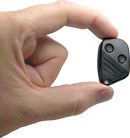
mini keyfob transmitter

•  Remote control upgrade kit  •

www.garage-door-remotes.co.uk are a specialist
mail order supplier of remote control transmitters

we do not supply any other spares for Hormann door operators


PLEASE NOTE:
Remote controls are despatched by Royal Mail recorded delivery,
if you are not at home to sign for the goods when your postman calls 
please provide an alternative address
on our on-line order checkout page


option for orders
over £35

Same day despatch on orders submitted by 4pm
Next-day delivery also available*
(*on orders placed Mon to Thurs only)

choose 'next-day' delivery at the checkout

•  Delivery Options  •  Will a Signature be Required ?  •

•  Ecostar transmitters  •
Spares &  Accessories  •  Door Security  •
•   Customers Feedback Comments   •
 •   Site Index   •    Home Page    •    Contact Us   •


Remote control handset and key-fob transmitters by mail order

Garage Door Remotes
www.Garage-Door-Remotes.co.uk
is a trading name of Amourelle Products Ltd

Inventors of the Securi-Dor automatic security locking device for motorised garage doors

Pay on-line by

PayPal express checkoutorAccepted Payment Cards

It's No Problem dealing with us!  -  We give old fashioned Customer Service at reasonable prices !


Making A Purchase
Making an on-line purchase could not be easier. Just browse our online shop, and click 'Buy Now' beside the items that you wish to buy and put them into the shopping cart. Click on 'Add More Items' to add further items to your basket.  You can click on 'View Basket' at any time to view or delete items you have within it. After you have finished your selection, click on 'Proceed to Checkout' and you will be asked for a few details that we need to be able to satisfy the order.  We accept Visa, Mastercard, Maestro, Solo, Electron or cheques in the post. We do not accept American Express. 90% of orders are despatched the same day, details of stock availability is shown beside the product.

Safe Secure On-Line Shopping
Our shopping cart system is operated on a dedicated e-commerce processing network and uses the highest level of security encryption for areas of our shopping process that handle your credit card details so you can be assured of 100% security when submitting your card details to our online payment facility >> more

Our Delivery Options >> click for details

 Payment By Cheque
Our on-line checkout can create a pro-forma invoice
you can to post to us with your payment >> details

We are unable to accept telephone orders

Problems with Cookies
Cookies are used on our shopping site to keep track of items you place in your shopping basket before you place your order.  Cookies are a fairly common occurrence in online shops.

If you are unable to access our shopping basket checkout page or a 'cookie error message' is displayed when trying to place an order It is likely that your browser is set to block the use of 'cookies'

In order to use our site you may need to change your browser security setting from 'Block all cookies', to 'Medium' which will allow common and usually harmless cookies to be used, whilst still maintaining good level of internet security.


How to adjust your cookie settings: (for Internet Explorer)
1) Open your browser
2) Go to Tools > Internet Options from the top bar
3) Go to privacy tab and move the bar down until 'Medium' is selected.
4) Click 'apply' and close.

The UK's #1 Garage Door Spares and Automation Specialists
©Copyright 2010 Amourelle Products Ltd  Reading, Berkshire. United Kingdom
Established 1982 - Registered in England No. 1640847 - VAT Reg. No. GB 642 0832 61

•  Trading Terms & Conditions  •

 
No part of this web site may be copied or reproduced without the written permission of Amourelle Products Ltd. Great care is taken to ensure that the information contained on this site is accurate, but APL cannot be held responsible for any error or miss-statement which may have occurred. 

All images and content are property of Amourelle Products Ltd
A licence to use an image may be purchased on-line.  click for details

Page protected by Copyscape - do not copy


Our on-line shop is powered by  

RomanCart

To get the most from your visit we suggest that you view 'full-screen'